Mortuary Dispatch Network, LLC ("MDN") sends operational text messages about removals: transport offers and assignments to drivers, status updates and custody alerts to the organizations involved, and transport updates to a family contact who agreed to them. MDN sends no marketing texts.
Agreement is always optional, and nobody can agree on someone else's behalf. MDN texts a driver or an organization only after it has recorded who agreed, when, how and to which wording. This page shows every place a person agrees.
01
A driver signs up
Who: Drivers, on the public sign-up page at mdnapp.com/register/driver.
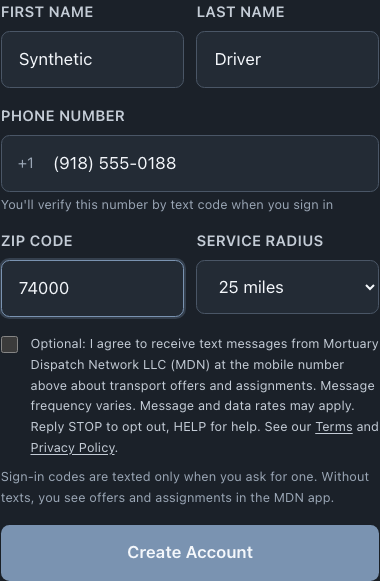
The text message box is optional and starts unchecked. A driver can create an account without ticking it.
When the box is ticked, MDN records the date and time, that it was given at sign-up, and which wording was shown. MDN texts the driver only after that record exists.
Sign-in codes are texted only when you ask for one. Without texts, you see offers and assignments in the MDN app.
Wording next to the box:
Optional: I agree to receive text messages from Mortuary Dispatch Network LLC (MDN) at the mobile number above about transport offers and assignments. Message frequency varies. Message and data rates may apply. Reply STOP to opt out, HELP for help. See our Terms and Privacy Policy.
Driver sign-up form with the optional, unchecked text message box. Screenshot from the MDN app with example data. Select to enlarge.
02
An organization signs up
Who: The admin of a funeral home, facility or removal provider, on the public sign-up pages.
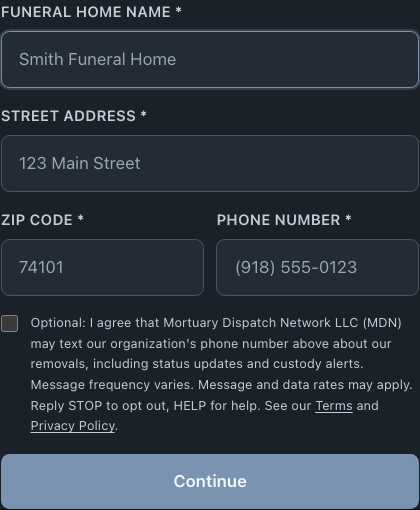
The box is optional and starts unchecked. The organization can register without it.
When ticked, MDN records who agreed, when, and which wording was shown. It covers the organization phone number entered on the form.
Wording next to the box:
Optional: I agree that Mortuary Dispatch Network LLC (MDN) may text our organization's phone number above about our removals, including status updates and custody alerts. Message frequency varies. Message and data rates may apply. Reply STOP to opt out, HELP for help. See our Terms and Privacy Policy.
Funeral home sign-up form with the optional, unchecked text message box. Screenshot from the MDN app with example data. Select to enlarge.
03
Staff add a driver
Who: Funeral home and removal provider staff adding a driver to their team.
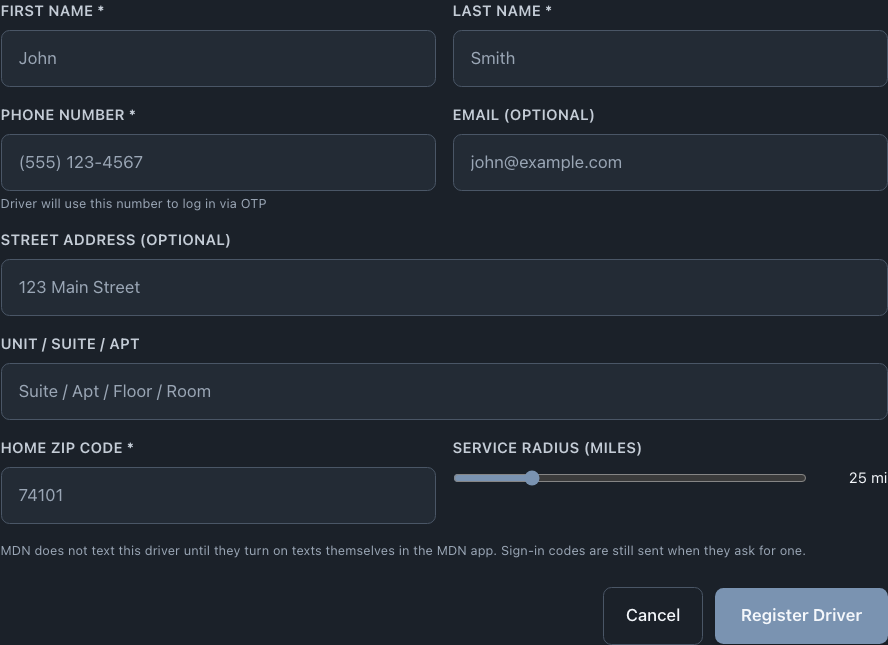
Staff cannot agree for a driver, so the form has no consent box. It tells staff that MDN will not text the driver until the driver turns texts on.
Where staff assign removals, a driver with texts off is marked "Texts off" so staff call them instead.
Notice on the staff form:
MDN does not text this driver until they turn on texts themselves in the MDN app. Sign-in codes are still sent when they ask for one.
Staff add-driver form showing that MDN will not text the driver until they turn texts on. Screenshot from the MDN app with example data. Select to enlarge.
04
The driver or admin is asked after signing in
Who: A driver, or an organization admin, whose texts are off.
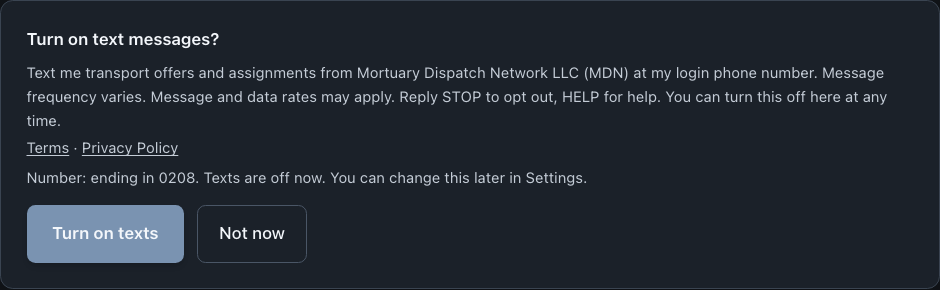
After signing in, they see a prompt with the full wording. "Turn on texts" records their agreement; "Not now" leaves texts off and asks again at the next sign-in.
Accounts that existed before this record was kept start with texts off and are asked this way.
Wording in the prompt (driver):
Text me transport offers and assignments from Mortuary Dispatch Network LLC (MDN) at my login phone number. Message frequency varies. Message and data rates may apply. Reply STOP to opt out, HELP for help. You can turn this off here at any time.
Prompt after sign-in asking the driver to turn on text messages. Screenshot from the MDN app with example data. Select to enlarge.
05
Turning texts on or off in Settings
Who: Drivers in Account settings; organization admins in Settings.
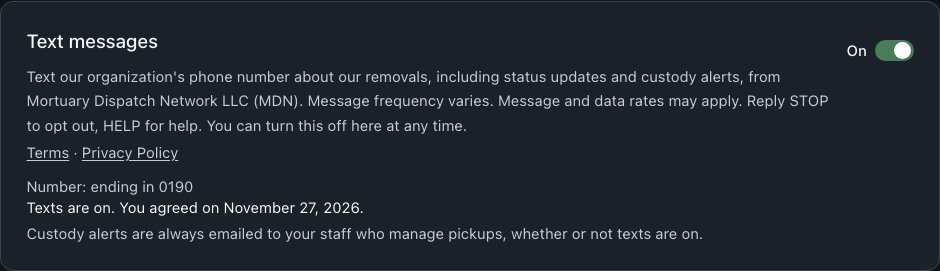
A switch, off until the person turns it on, with the full wording beside it. Turning it off stops MDN texts to that number at once. Replying STOP also works.
Changing the phone number turns texts off; the person must agree again for the new number.
Wording beside the organization switch:
Text our organization's phone number about our removals, including status updates and custody alerts, from Mortuary Dispatch Network LLC (MDN). Message frequency varies. Message and data rates may apply. Reply STOP to opt out, HELP for help. You can turn this off here at any time.
Text messages switch in settings, with the wording and the date the person agreed. Screenshot from the MDN app with example data. Select to enlarge.
06
Family contacts agree by voice
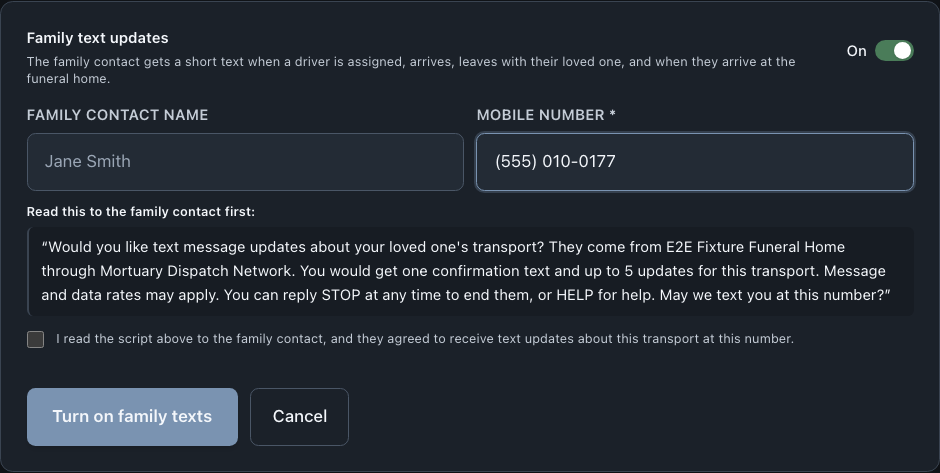
A family contact is usually reached by phone or in person by the funeral home or the officer handling the removal. Family texts are off on every removal by default. To turn them on, staff must read the script below to the family contact, then tick a box confirming the family contact agreed. The app shows staff this exact script at that moment, with the funeral home's name filled in.
The full script staff read:
“Would you like text message updates about your loved one's transport? They come from [Funeral Home] through Mortuary Dispatch Network. You would get one confirmation text and up to 5 updates for this transport. Message and data rates may apply. You can reply STOP at any time to end them, or HELP for help. May we text you at this number?”
The box staff tick after the family agrees:
I read the script above to the family contact, and they agreed to receive text updates about this transport at this number.
The family number then gets one confirmation text, which repeats how to stop, and at most 5 transport updates for each funeral home that handles the transport. Changing the number needs the family's agreement again.
Family text updates on a pickup, showing the script staff read and the confirmation box. Screenshot from the MDN app with example data. Select to enlarge.
Before sending a family member a private Family Care link, staff read:
“May we text you a private link to share arrangement information with [Funeral Home]? It comes through Mortuary Dispatch Network as one text. Message and data rates may apply. You can reply STOP at any time, or HELP for help. May we text you at this number?”
Staff also confirm the person agreed before the link is created, and confirm again before the one text is sent.
07
Sample messages
Exact wording with example names. Texts never name the person who died.
Driver who agreed to texts · A nearby transport is offered
MDN transport offer
From: Saint Example Hospital, Tulsa, OK
To: TBD
Distance: 4.0 mi (~9 min)
Expires: 1 min

Review & respond securely in MDN: https://mdnapp.com/dashboard/driver/offers
Reply STOP to opt out.
Driver who agreed to texts · The driver is assigned a removal
MDN: You have been assigned a removal. Open the MDN app for details.
Reply STOP to opt out.
Facility or funeral home that agreed to texts · A removal changes status
MDN: Removal update from Saint Example Hospital: Transport in progress.
Ref: a1b2c3d4
Open MDN for details.
Reply STOP to opt out.
Funeral home that agreed to texts · A removal is held for a custody problem
MDN custody alert: a removal is held for a custody problem. Open MDN to review it.
Reply STOP to opt out.
Family contact who agreed by voice · Right after staff turn family texts on
Example Funeral Home via MDN: You will receive transport updates for your loved one. Up to 5 transport updates. Msg & data rates may apply. Reply HELP for help, STOP to opt out.
Family contact who agreed by voice · Their loved one leaves the facility
Example Funeral Home via MDN: Your loved one has departed from Saint Example Hospital and is being transported to Example Funeral Home.
Reply STOP to opt out.
08
Opting out and help
Reply STOP to any MDN text to stop texts, or HELP for help. Drivers and organization admins can also turn texts off in Settings.
Message frequency varies. Message and data rates may apply. Carriers are not liable for delayed or undelivered messages.
Help: deemer@mdnapp.com. Mobile numbers and consent are never shared with or sold to third parties for marketing. See the Terms of Service and Privacy Policy.